PDF Studio › All tools › Convert PDF tables to Excel
Convert PDF tables to Excel
Pull tables out of a PDF into an Excel workbook. Columns are detected from how the text lines up, and numbers are stored as real numbers, so totals and formulas work straight away.
Open PDF to ExcelFree, no sign-up, no watermark. The file is processed on your device and never uploaded.

How to convert
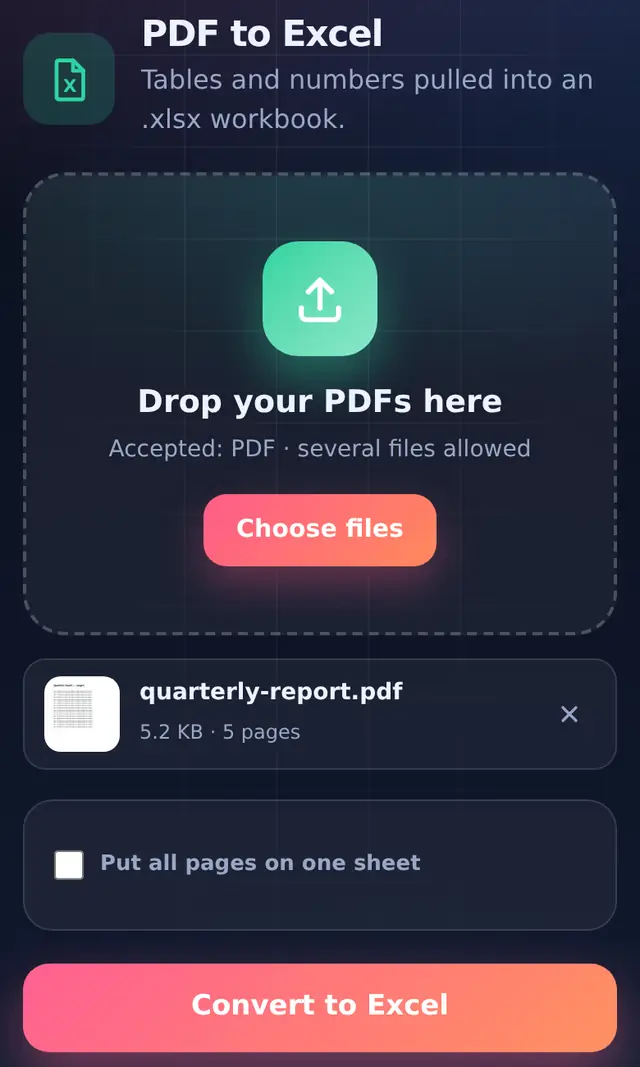
- Add the PDFStatements, invoices, price lists, mark sheets: anything with rows and columns.
- Choose one sheet or one per pageBy default each PDF page gets its own sheet named "Page 1", "Page 2" and so on. Tick Put all pages on one sheet to stack them, with a blank row between pages.
- Convert and downloadColumn widths are set to fit the content.
How columns are found
The tool looks at every line of text on a page and finds the number of columns that appears most often. The positions of those columns become the grid, so a right-aligned amount and a left-aligned heading still end up in the same column. Lines with a single piece of text, such as a title or a note, go in the first column.
Numbers you can calculate with
Cells that look like numbers are saved as numbers, not text:
| In the PDF | In Excel |
|---|---|
12,450.00 | 12450 (a number) |
(1,200) (accounting style negative) | -1200 |
₹ 500 or 18% | kept as text, because of the symbol |
If a column of amounts has a currency sign in every cell, use Excel's Find and Replace to remove the sign, and the values turn into numbers.
Limits to know about
- Scanned PDFs have no text layer. Those pages come out with the note "No text found on this page (it may be a scanned image)".
- Merged header cells spanning several columns land in one of the columns; tidy them after converting.
- Tables that continue across pages are split by page unless you choose one sheet.
Questions people ask
Should I use PDF to Excel or PDF to Word?
Use Excel when you need to sort, filter or add up numbers. Use PDF to Word when the document is mostly text with the odd table.
Does it work with bank statement PDFs?
Downloaded statements are usually text-based and convert well. Always check the totals against the original before relying on them.
Can I convert a spreadsheet back to PDF?
Yes, with Excel to PDF.