PDF Studio › All tools › Edit a PDF, including the text already in it
Edit a PDF, including the text already in it
Fix a typo, change a date or update a name in the PDF itself. Besides adding new text, the editor can replace the words that are already on the page, and it has the usual tools for highlighting, drawing, covering and rearranging pages.
Open the PDF editorFree, no sign-up, no watermark. The file is processed on your device and never uploaded.
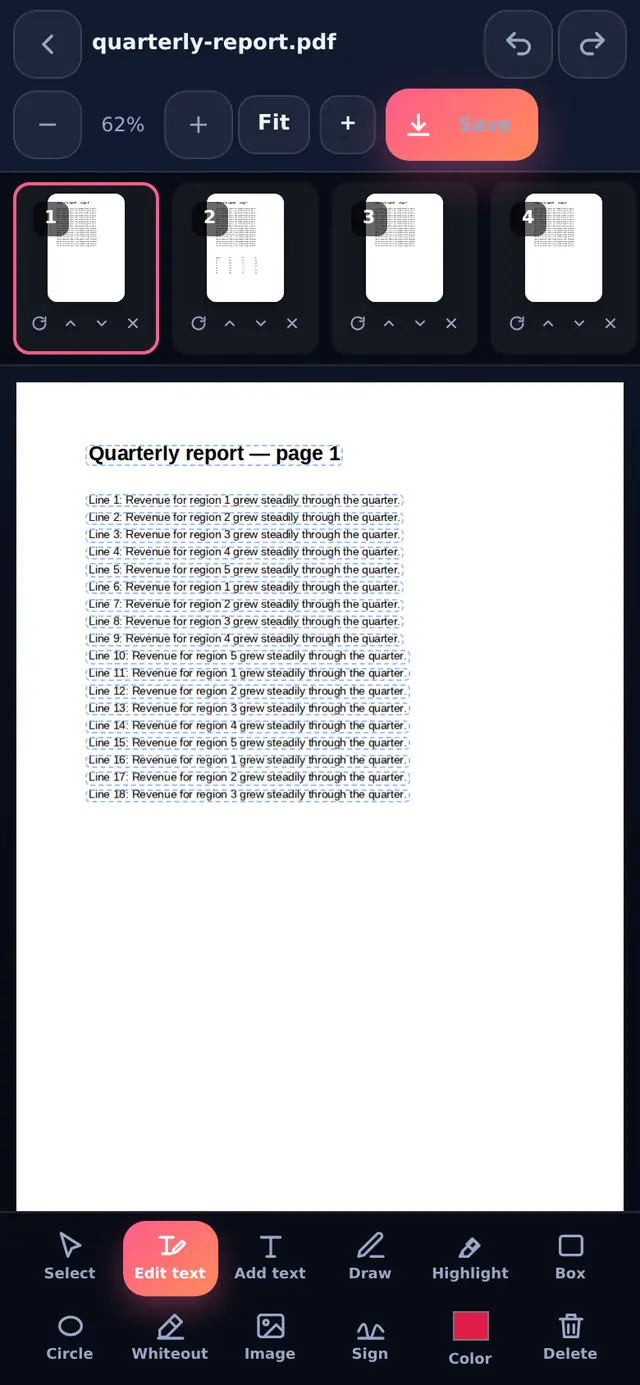
What the editor can do
| Tool | What it is for |
|---|---|
| Edit text | Change words that are already in the PDF |
| Add text | Type new text anywhere, in Helvetica, Times or Courier, any size and colour |
| Draw and Highlight | Freehand pen, and a see-through marker over text |
| Box and Circle | Mark or frame parts of a page |
| Whiteout | Cover something with a white box, for example before writing a new value on a scan |
| Image | Place a logo, stamp or photo on the page |
| Sign | Draw your signature and place it (see Sign PDF) |
| Page strip | Rotate, move up, move down or delete each page; add a blank page |
Every change can be undone and redone, and items you add can be moved, resized, duplicated or deleted until you download.
How editing existing text works
- Open the PDF and choose Edit textThe editor reads the text on the page and outlines each line it can change.
- Tap a line and typeThe original words are removed from the page, not just covered up, and your new text is written in their place at the same size.
- DownloadPress Download PDF (on a phone, Save). You get a new file; the original stays as it was.
A PDF usually contains only the letters it needs from each font, so the exact original font often cannot be reused for new words. The editor picks the closest standard font instead: a sans-serif font such as Arial becomes Helvetica, a serif font such as Times New Roman becomes Times, and a typewriter font becomes Courier, keeping bold and italic. On most documents the change is hard to spot; on designed documents with unusual fonts it can be visible. Our article on why fonts change when you edit a PDF explains this in more detail.
Limits to know about
- Scanned pages have no text to edit. They are pictures of paper. Use Whiteout over the old value, then Add text on top.
- Whiteout hides, it does not delete. Text under a white box is still in the file and can be copied out. To really remove words, change them with Edit text, or remove the page.
- Only straight, left-to-right lines are offered for editing. Rotated or vertical text is left alone.
- Hindi and other scripts are placed as a sharp image of the text, so they display correctly, but that part cannot be selected or searched afterwards.
- Big layout changes such as adding a paragraph that should push the rest of the page down are not possible in any PDF editor, because PDF pages do not reflow. For that, convert to Word, edit, and convert back.
Questions people ask
Can I edit a PDF on my phone?
Yes. The editor works with touch: tap to select, drag to move, and pinch with two fingers to zoom.
Does editing reduce quality?
No. Pages are not turned into images; your changes are added to the original page content.
Is it legal to edit a PDF?
Editing your own documents is fine. Changing official documents to mislead someone is not, and our terms of use do not allow it.